What people needed to know
The information required to make decisions at each stage of the publication.
CASE STUDY
CREATIVE OPERATIONS · WORKFLOW DESIGN · PRODUCT THINKING · CREATIVE TECHNOLOGY
LeafSlate is a visual coordination workspace for complex publications, bringing page planning, imagery, people, notes, and production decisions into one connected view.
LEAFSLATE BEGAN WITH A QUESTION
Could that entire process be easier to see and coordinate?
I studied an existing catalog-production workflow and translated what I learned into a working product designed to support planning, visual decision-making, and coordination as a publication evolves.

The original catalog process relied on shared documents, spreadsheets, folders, screenshots, and manually maintained records to coordinate a publication with 100–200+ pages and spreads.
As imagery, people, notes, and production decisions changed, information had to be checked and updated across multiple sources. A change in one place could leave another reference outdated.
That created two problems at once:
too much repetitive maintenance
no reliable way to keep related information connected over time
The opportunity was not simply to make the process faster.
It was to keep related information dependable as the publication changed.
I sat with the primary user and observed the catalog-production process in real time, documenting where information was copied, rechecked, or reconstructed as work progressed.
The discovery focused on three things:
The information required to make decisions at each stage of the publication.
Which documents, files, tools, or people held the context needed to keep the work moving.
Where updates created repeated checking, duplicated work, or stale information elsewhere in the process.
The goal was not to reproduce the old process in a new interface. It was to distinguish essential work from workarounds and identify where a connected system could help.
Once I mapped the workflow, I organized LeafSlate around the publication itself: workspaces, catalogs, a visual flatplan, and individual spreads.
Inside the spread workspace
Each spread brings together the imagery, people, notes, status, and visual context needed to make decisions.
Instead of reconstructing that information across separate documents, the system keeps the context around each spread connected as the publication evolves.
A team often needs to explore imagery and discuss direction before a final page layout exists.
As the design develops, those choices may need to change. An image that worked during early planning may no longer work once the typography, composition, and page structure become visible.
LeafSlate preserves that visual context as the publication progresses.
LeafSlate is not intended to replace Adobe InDesign or Affinity Publisher. Those tools provide the precision needed for page design and print production.
LeafSlate serves a different purpose: giving the wider creative and production team a visual space to explore, review, and discuss the publication without working inside specialist design software.
Design software is where the page is built.
LeafSlate is where the wider team can see it, discuss it, and help move it forward.
More control is not automatically better.
Rather than adding unrestricted positioning, cropping, resizing, or full layout controls, I kept the Spread Workspace focused on a limited set of visual arrangements, including left-page, right-page, full-spread, and partial-page compositions.
The goal is to communicate an idea clearly enough to make a decision without introducing the complexity of another layout application.
Match the fidelity of the tool to the decision being made.
Enough control to communicate intent.
Not enough complexity to slow the work down.
A catalog with more than a hundred pages should not feel like a hundred disconnected tasks.
LeafSlate connects a publication-wide overview with spread-level decisions, allowing users to move between planning, review, and detailed work.
The Flatplan brings page order, spread relationships, production status, and overall progress into one visual overview.
It allows users to understand where the publication stands and move directly to a spread that needs attention.

The Flatplan shows the publication's structure. Catalog Preview Mode shows how it comes together as a book.
Page-turn transitions, a thumbnail rail, and responsive spread presentation allow the team to review sequence, pacing, and visual continuity. Users can also open the current spread directly in the Spread Workspace when something needs attention.
Each spread has a focused working environment connecting imagery, placement previews, notes, linked people, and production status.
Candidate, selected, and rejected image states preserve what has already been considered. Selected imagery can be previewed within the spread to evaluate how it works in context.

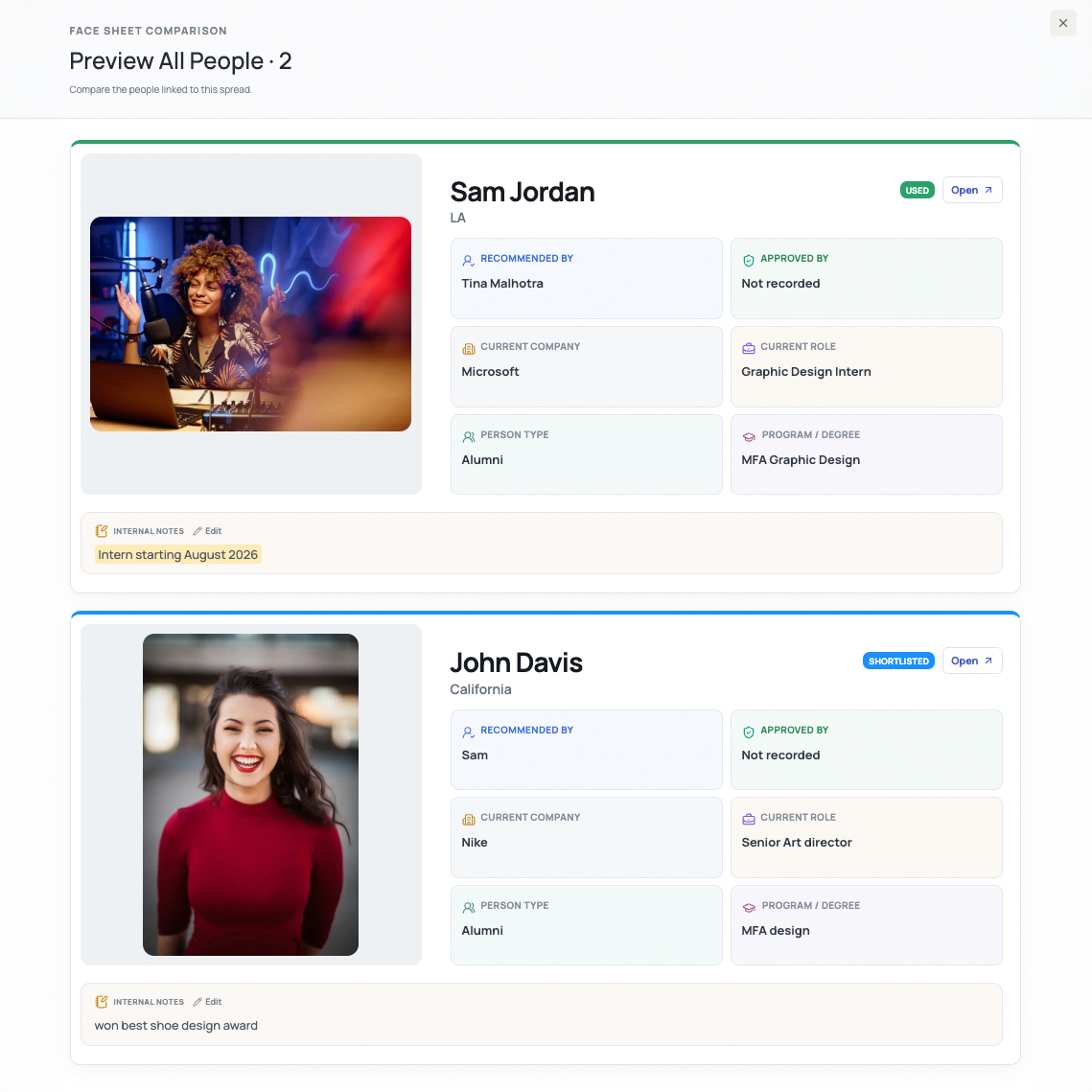
People linked to a spread remain accessible through face sheets containing relevant profile information, approvals, and notes.
The team can find that context without searching through separate records.
See the publication as a whole.
Work through the decisions spread by spread.
LeafSlate separates the structure essential to publication work from the details that may vary between teams.
The core remains consistent: catalogs, spreads, pages, images, people, and notes.
Other areas—such as production statuses, note labels, templates, and workspace preferences—are designed to support configuration as that functionality develops.
A team might use:
Photography Needed → Selecting → Ready for Review → Approved
while another workflow may use different status language.
The objective is not unlimited flexibility. It is a dependable foundation with room to adapt where that flexibility is useful.
DESIGN PRINCIPLE
The workflow needs structure, but not every detail needs to be fixed.
Some things should stay consistent.
Some things should be configurable.
Some decisions need constraints.
Some details need room to change.
FLEXIBILITY WHERE IT HELPS.
STRUCTURE WHERE IT MATTERS.
A useful prototype answers whether an idea works. Developing it for multiple users introduces another set of questions.
Who can change information? How should permissions differ? What happens when two people edit the same record?
Those questions shaped the move toward authentication, role-based access, database-level authorization, controlled changes, and version-aware conflict protection.
The current role model includes:
Owner · Admin · Editor · People Editor · Viewer
Permissions are enforced at the data layer, not just by what users can see or click in the interface.
The hosted system has been tested against unauthorized access, invalid changes, stale versions, ordering conflicts, and concurrent edits. When editing conflicts occur, LeafSlate surfaces them instead of silently overwriting work, while preserving the user's draft.
LeafSlate is designed around one real publication workflow. It is not being presented as a commercial SaaS product.
At the same time, I organized the architecture around workspaces rather than assuming the system would always serve a single fixed context.
That was a deliberate decision: solve the immediate problem without building unnecessary limitations into the foundation.
LeafSlate's core workflows are developed in a working product and staged for testing, with additional functionality still being refined. A real-workflow pilot and measurement of impact are still ahead.
The goal is not to make LeafSlate look finished before it is. It is to keep building it around evidence.
With the core experience developed, the next priority is understanding how well it holds up in real use.
The questions I want to answer are straightforward:
Those findings will guide usability refinement, continued stakeholder validation, pilot testing, and eventual measurement of workflow impact.
BUILD APPROACH
I defined the product logic, workflows, interaction requirements, and testing criteria, using AI-assisted development tools including OpenAI Codex to accelerate implementation and iteration.
Stack: Next.js · TypeScript · Supabase/PostgreSQL · Vercel
REFLECTION
LeafSlate began as a question about visualizing a catalog. It became an exercise in understanding the information, dependencies, and decisions that support creative work.
The most important decisions were not about how many features to build. They were about which connections, constraints, and safeguards could make the work clearer without introducing unnecessary complexity.
That is the lesson I take from the project: understand the work first, then design the system that supports it.